Log In
This component is used to log a user in. Once email address and password are set, the sign up is triggered after a signal is sent to the Do input.
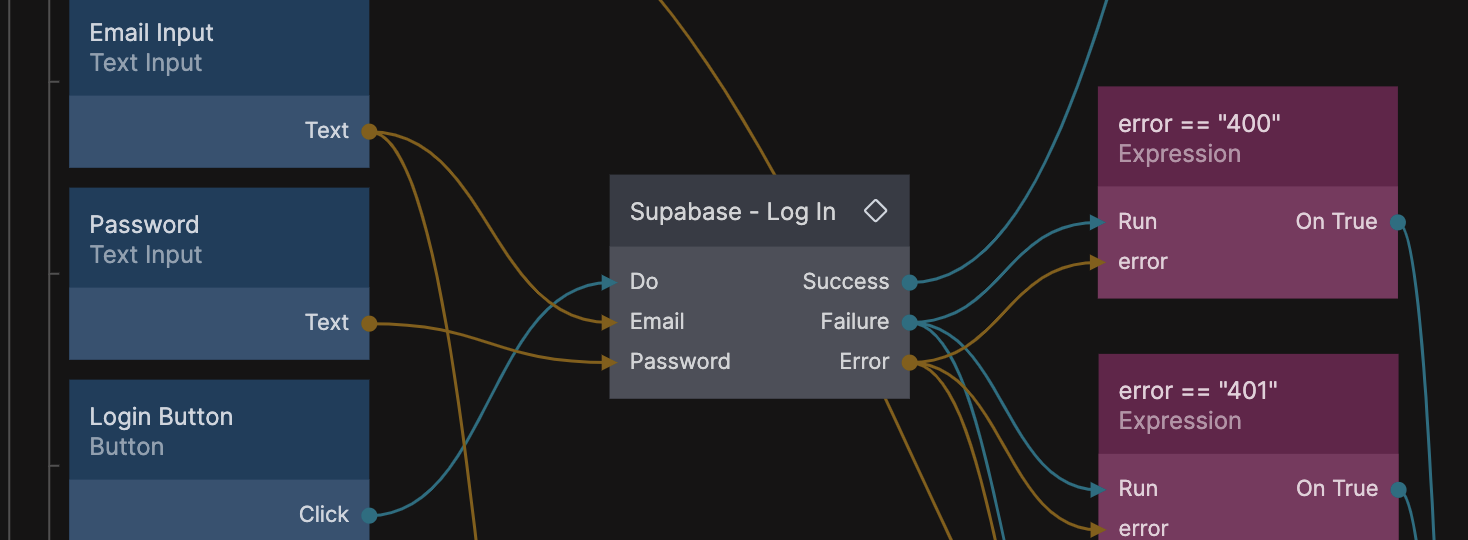
Please note that Supabase Client needs to be set up in your app before you can properly use this component.
On success
When a user has successfully been logged in the Log In component will create a Noodl Object with the id currentUser. This object contains all the user data. You can use the Supabase - Fetch Current User Profile Data to refresh all non-auth data for the user.
A successful login will also trigger a Supabase User Logged In event. You can hook into to this event anywhere in your app using a Receive Event node.
Inputs
| Data | Description |
|---|---|
| Sets the email used to log in the user. | |
| Password | Sets the password used to log in the user. |
| Signals | Description |
|---|---|
| Do | Triggers the login call. |
Outputs
| Data | Description |
|---|---|
| Error | The error sent back after a failed login call to Supabase. |
| Signals | Description |
|---|---|
| Success | Sends a signal when the request succeeded. |
| Failure | Sends a signal when an error occurred, and logs an error message in the console. |